
This blog post is old. We now have a Rafflecopter Facebook app — check it out!
For those using Rafflecopter’s widget to run giveaways on Facebook, we have some updates that we think make your giveaways run better.
We’ve been looking into a whole bunch of different iFrame applications after several Facebook fans had mentioned they were having issues with viewing the widget. We found an application that works much better than the one we recommended in our post several weeks ago. We’re recommending that you use the iframe application called “Static iFrame” (http://apps.facebook.com/iframe-static/).
We strongly recommend using this application on Facebook with Rafflecopter instead of the old iFrame app moving forward! Here are some easy step-by-step instructions:
- Go to http://apps.facebook.com/iframe-static/
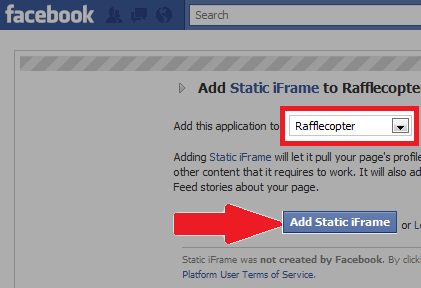
- Choose the page you’d like to add this application to and click “Add Static iFrame”
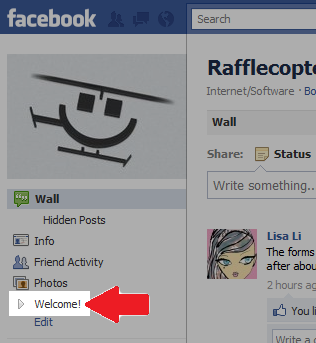
- On the page you’re adding the application to, find the new tab underneath your page’s profile picture that shows a gray arrow that says “Welcome!”
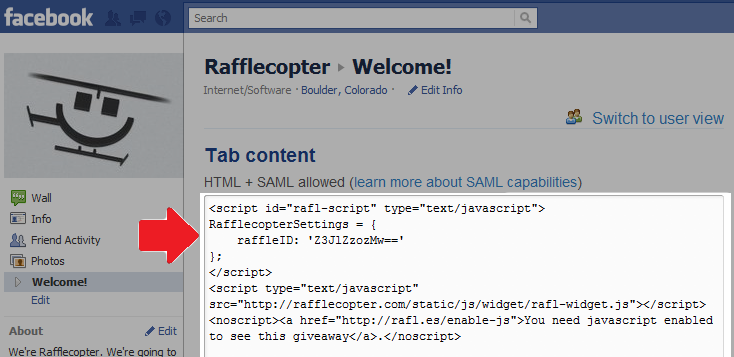
- Click on the “Switch to admin view” link on the upper right hand corner of the page

- Copy and paste your Rafflecopter code (and any other HTML you’d like!) in the top “Tab content” box, click the “Save changes and view page” button, and refresh the page.
If you’d like to change the name of the tab from ‘Welcome’ to something else:
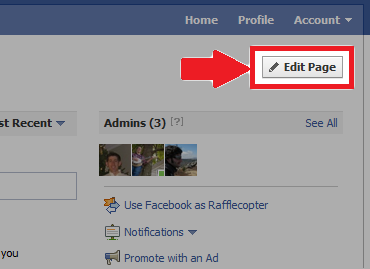
- Go to your Facebook page where the application is, and hit the “Edit Page” on the top right.
- Click on ‘Apps’ on the left hand side of the screen. Scroll down on the page until you see “Static iFrame”.
- Click on “Edit Settings” below the application description, type in the name you want, and hit “Save”.
Switching to this application should result in less issues for those who use Internet Explorer and slower connections. If you have any questions, please don’t hesitate to contact us @ support@rafflecopter.com.

*Psst* Want to learn about Facebook’s rules pertaining to giveaways? Check out our Facebook Promotion Guidelines page.

Pingback: Run Giveaways on Facebook with Rafflecopter | Rafflecopter Blog()
Pingback: Giveaways and Promotions on Facebook: What’s Allowed? | Rafflecopter Blog()
Pingback: Amazon Facebook Blast Event()
Pingback: Blogger Opportunity: Facebook Amazon Blast()
Pingback: A Bit Geeky - Facebook Blast Signups now open()
Pingback: BLOGGERS: Join the Facebook Amazon Blast()
Pingback: Facebook Blast Event – Join Today & #RockYourBlog2012()
Pingback: Thejoyofsaving | The Joy of $aving Money()
Pingback: Blogger Sign-up for Amazon Facebook Blast | Susie B. Homemaker()
Pingback: Rockin' Deals » Blog Archive » Amazon Facebook Blast Event #giveaway()
Pingback: Amazon Facebook Blast Event | The Joy of $aving Money()
Pingback: Amazon Facebook Blast Event and Hearts A Fire Event « Sweepstakes Mama()
Pingback: Rafflecopter to Run Giveaways on Facebook | Fanpage Competitions()
Pingback: Facebook Blast Sign Up Open ~ Feb 1-15, 2012 - Celebrate Woman Today()
Pingback: Sarah's Faves » Blog Archive » FAVE RESOURCE: A #blogger’s must have for running contests, challenges and promotions()
Pingback: Amazon Facebook Blast Event - A Girl Worth Saving()
Pingback: Facebook Blast Signups now open - Common Centsability()
Pingback: Facebook Blast Signups now open - Debt Zapper : Debt Zapper()
Pingback: My Devotional Thoughts | Facebook Amazon Blast Sign-Ups Now Open()
Pingback: Facebook Amazon Blast()